
Amazon Bedrock: The Complete Guide to AWS’s Generative AI Platform
What is Amazon Bedrock?
- Amazon Bedrock is an AWS fully managed, serverless service that gives you API access to many high-performing foundation models (FMs) from AWS and leading AI companies so you can build generative AI applications without managing ML infrastructure. It is designed to let developers quickly experiment with, customize, and deploy models like LLMs and image generators inside the AWS ecosystem with strong security and governance controls.
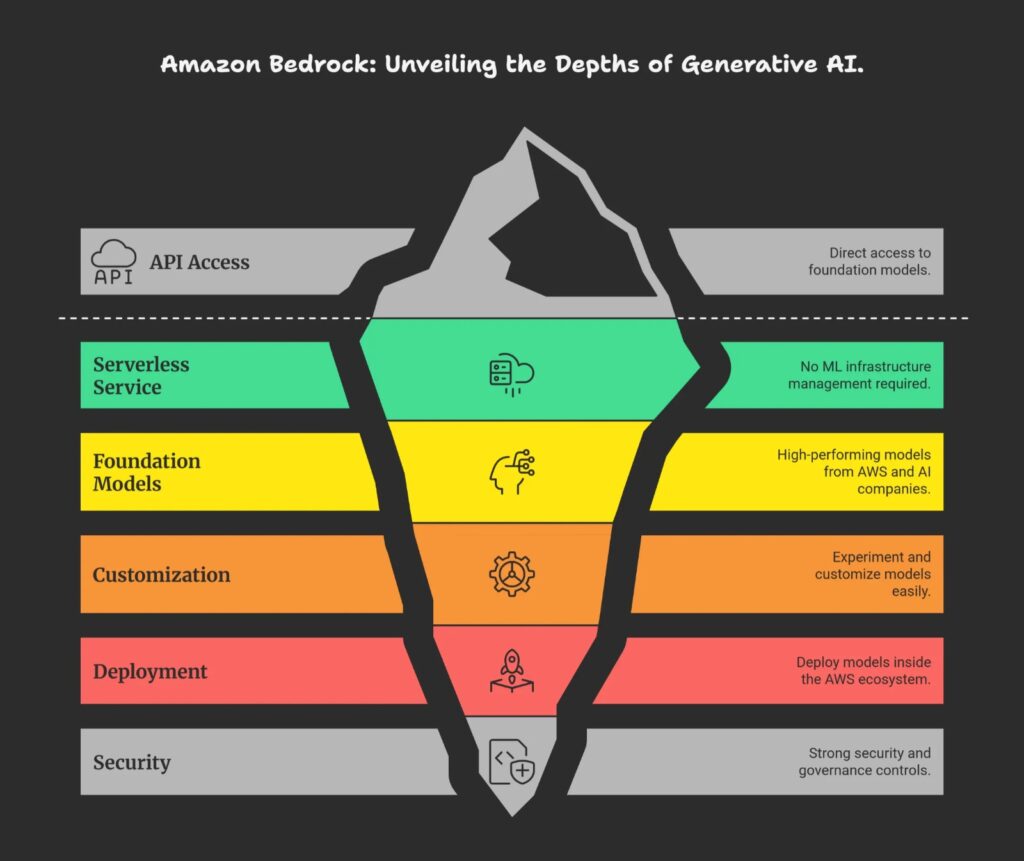
- Amazon Bedrock provides a single, unified API to call different foundation models (for text, chat, images, etc.) from providers such as Anthropic, Meta, Stability AI, Cohere, Mistral, and Amazon’s own Titan models. Instead of provisioning GPUs, handling scaling, or hosting models yourself, you consume them as a managed cloud service, paying per use.
- So it’s called a fully managed service. That means that for you, there is no service to manage. You just use the service on AWS and Amazon Web Services will make sure that the service is working for you. So you’re going to keep control of all the data you’re going to use to train the model, because it all happens within your account. It never leaves your accounts. You’re going to have a pay-per use pricing model, but we’ll go into the pricing model later on as well.
- There’s a unified API, so that means that to access Amazon Bedrock and the many models behind Amazon Bedrock, you only have one way of doing it, which is standardized. You can leverage a wide array of foundation models.
Main capabilities
- Model choice and evaluation: Try multiple FMs, compare quality, latency, and cost, and pick the best model for your use case (chatbots, code assistants, summarization, image generation, and more).
- Customization: Use techniques like fine-tuning and retrieval-augmented generation (RAG) to adapt base models to your own data without exposing that data for model training by the provider.
- Agents and workflows: Build “agents” that can call APIs, query your internal systems, and orchestrate multi-step tasks based on user prompts.
Security, safety, and integration
Amazon Bedrock emphasizes enterprise features: encryption in transit and at rest, IAM-based access control, VPC networking options, and the guarantee that your data is not used to train the underlying foundation models. It also includes guardrail features to filter harmful or unwanted content and integrates tightly with other AWS services like Lambda, S3, CloudWatch, and CloudTrail for logging, monitoring, and automation.
What problem does Amazon Bedrock solve?
Amazon Bedrock solves the challenges of building and deploying generative AI applications by providing managed access to multiple high-performing foundation models without requiring developers to handle infrastructure, model training, or scaling themselves. It eliminates the need to choose, provision, and manage individual AI providers or hardware like GPUs, while ensuring enterprise-grade security and data privacy.
Key problems addressed
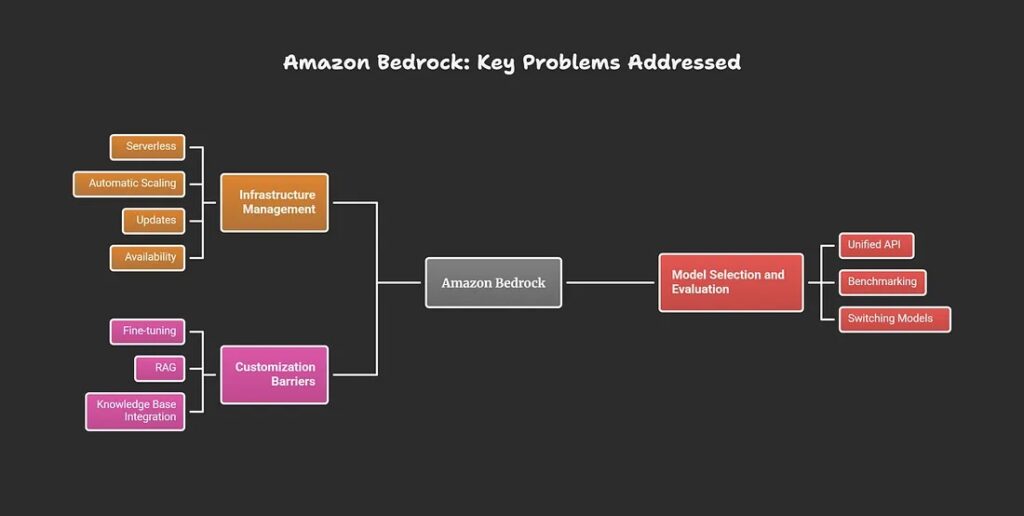
- Infrastructure management: Developers avoid provisioning servers, GPUs, or clusters; Bedrock is fully serverless and handles automatic scaling, updates, and availability.
- Model selection and evaluation: Offers a unified API to experiment with, benchmark, and switch between foundation models from multiple providers (e.g., Anthropic, Meta, Amazon Titan) based on performance, cost, or task fit.
- Customization barriers: Enables easy fine-tuning, RAG, or knowledge base integration using your private data, without that data being used to retrain provider models.
Enterprise hurdles overcome
Bedrock addresses data security concerns by keeping your inputs/outputs private (no training on customer data), integrating with AWS IAM/VPC for access control, and providing guardrails against harmful content. It also speeds up development by letting teams build agents that orchestrate APIs, workflows, and enterprise systems via natural language prompts, reducing time-to-market for AI features like chatbots or summarizers.
How does Bedrock compare to running models on EC2 or SageMaker?
Amazon Bedrock differs from running models on EC2 or SageMaker by offering a fully managed, serverless platform for using pre-trained foundation models via API, eliminating infrastructure setup, while EC2 requires manual instance management and SageMaker provides managed ML workflows with more customization control.
| Aspect        | Amazon Bedrock                              | Amazon SageMaker                            | EC2 (Self-Managed)                         |
|---------------|-----------------------------------------------|----------------------------------------------|---------------------------------------------|
| Management    | Fully serverless; no infra setup              | Managed ML platform; some config needed      | Fully manual: provision, scale, patch       |
| Model Focus   | Pre-trained FMs from multiple providers       | Custom training + JumpStart models           | Any model; you host/train everything        |
| Customization | Prompting, fine-tuning, RAG                   | Full: train/tune from scratch                | Complete control via code/Docker            |
| Scaling       | Automatic, pay-per-use                        | Auto-scaling configurable                    | Manual or Auto Scaling Groups               |
| Startup Time  | Immediate API access                          | Minutes for endpoints                        | Minutes+ for instances                      |
| Cost Model    | Per token/inference                           | Per instance hour + training                 | Per instance hour                           |
| Best For      | Rapid gen AI apps, no ML expertise            | Custom ML workflows, data scientists         | Fine-grained control, cost optimization     |
When to Choose Each?
Bedrock suits quick prototyping of chatbots or summarizers using ready models, with enterprise security and no ops overhead. SageMaker fits when building custom models or needing MLOps pipelines, bridging managed ease and flexibility. EC2 works for legacy setups, specific hardware (e.g., custom GPUs), or maximum cost control via Spot instances, but demands DevOps effort.
What are the features of Amazon Bedrock?
Amazon Bedrock offers a suite of features for building generative AI applications, including access to multiple foundation models via a unified API, serverless customization tools, agent orchestration, and enterprise-grade security.
1.Model Access and Experimentation
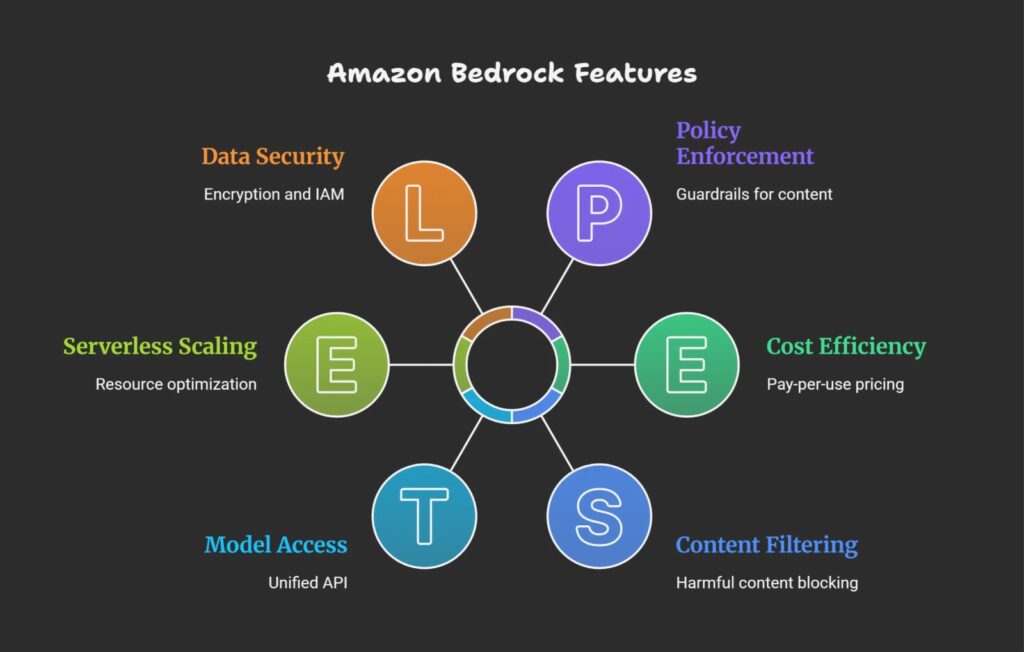
- Unified API to foundation models from providers like Anthropic (Claude), Meta (Llama), Stability AI, Cohere, Mistral, and Amazon Titan for text, images, and multimodal tasks.
- Playgrounds for testing chat, text generation, and images without code; model evaluation tools to compare performance, latency, and cost.
2. Customization and Agents
- Fine-tuning and retrieval-augmented generation (RAG) with your private data, keeping it secure within your AWS account.
- Agents for multi-step workflows: connect to APIs, databases (e.g., via Lambda, S3), and tools; AgentCore for memory, runtime, identity, and observability.
- Knowledge bases and prompt flows for streamlined RAG and prompt management.
3. Security and Operations
- Bedrock Guardrails to filter harmful content (up to 88% blocking), reduce hallucinations, and enforce policies.
- Serverless scaling, pay-per-use pricing, encryption (in transit/at rest), IAM/VPC integration, and no customer data used for training.
What are the benefits of Amazon Bedrock?
Amazon Bedrock offers several key benefits that simplify and accelerate building generative AI applications at scale without requiring deep ML expertise or infrastructure management.
Benefits
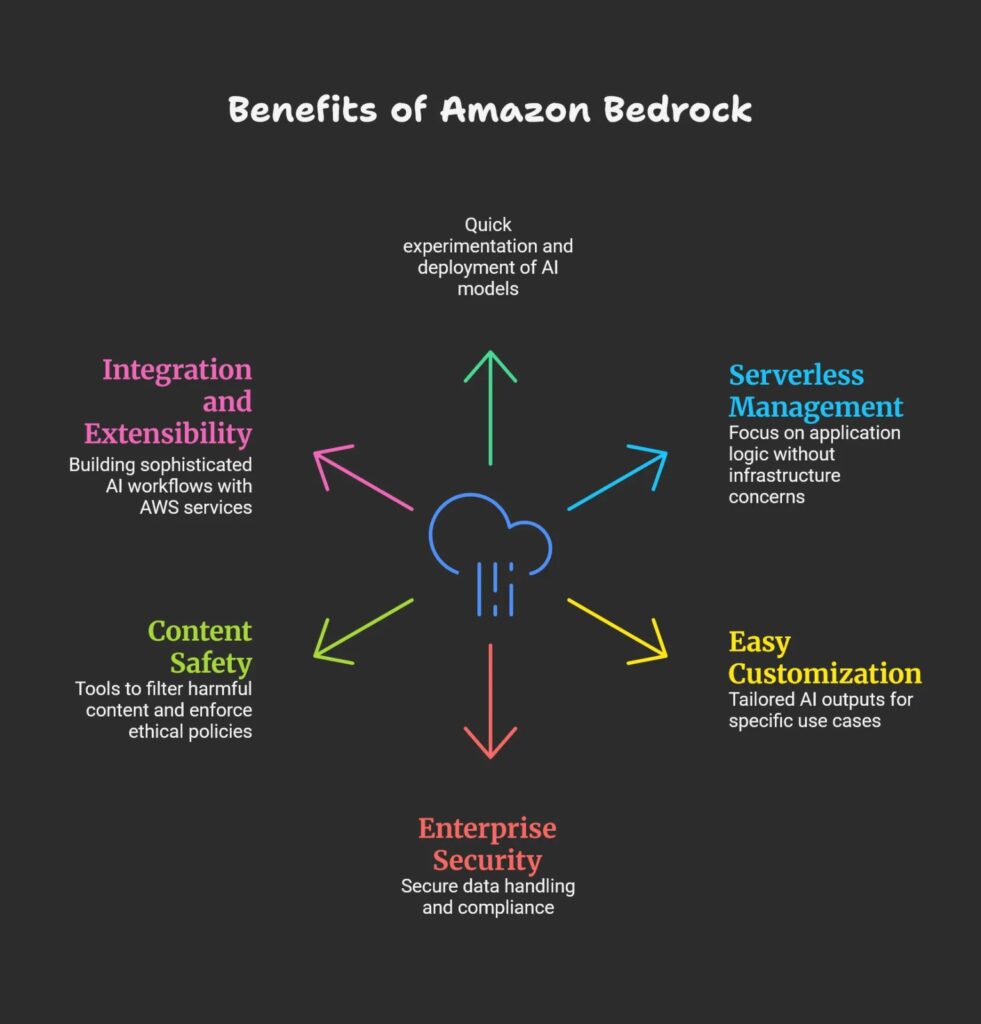
Rapid access to top foundation models: Provides unified API access to leading AI models from multiple providers, enabling quick experimentation and deployment without building or training models from scratch.
Serverless and fully managed: Eliminates the need to provision GPUs, manage scaling, or handle updates, letting developers focus on application logic rather than infrastructure.
Easy customization: Supports fine-tuning and retrieval-augmented generation (RAG) on private data, allowing more relevant and accurate AI outputs tailored to specific use cases.
Built-in enterprise security: Integrates with AWS IAM and VPC, encrypts data in transit and at rest, and keeps customer data private (not used for training), supporting compliance and governance requirements.
Content safety and guardrails: Includes tools to filter harmful content, reduce hallucinations, and enforce ethical policies for safer AI usage.
Integration and extensibility: Works with AWS services like Lambda, S3, CloudWatch, and CloudTrail for building sophisticated, observable AI workflows and agents.
These advantages make Amazon Bedrock ideal for enterprises wanting to lower barriers to generative AI adoption while meeting security, compliance, and operational needs.
How can I architect a solution by using Amazon Bedrock?
To architect a solution using Amazon Bedrock, you typically build a generative AI-powered application or agent by integrating Bedrock’s foundation models with your data sources, business logic, and AWS services for security, scaling, and orchestration.
Key architectural components
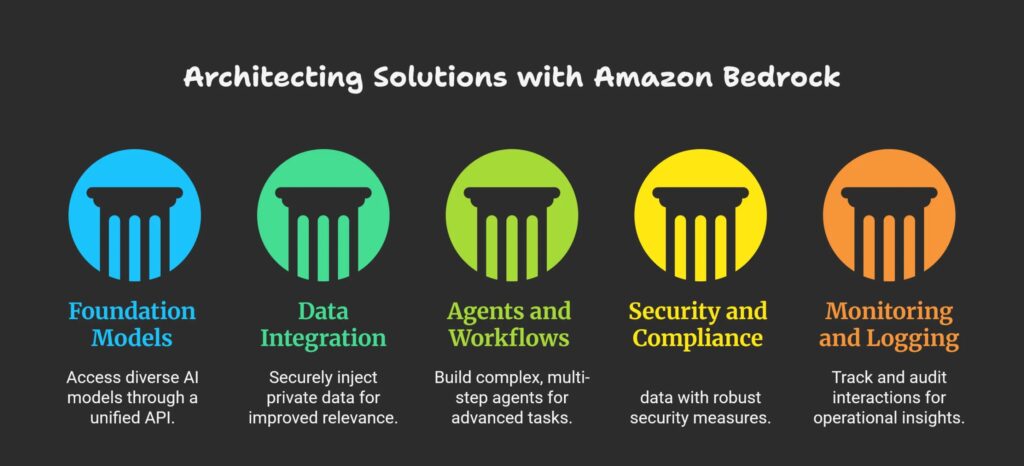
Foundation models via Bedrock API: Use Bedrock’s unified API to access multiple foundation models (e.g., for text, chat, images) from providers like Anthropic, Meta, and Amazon Titan. This abstracts away model hosting, scaling, and maintenance.
Data integration and customization: Implement retrieval-augmented generation (RAG) or fine-tuning to inject your private data into the model’s context securely, improving relevance and accuracy without exposing your data.
Agents and workflows: Build multi-step agents that can invoke external APIs, query databases (e.g., AWS S3, DynamoDB), or trigger AWS Lambda functions based on user prompts, enabling complex orchestration beyond simple text generation.
Security and compliance: Use AWS IAM roles, VPCs, encryption, and other security controls to protect sensitive data and ensure compliance. Bedrock guarantees customer data is not used for training underlying models.
Monitoring and logging: Leverage AWS CloudWatch and CloudTrail for operational monitoring, logging, and auditing of all interactions with the Bedrock API and your custom agents.
Example solution flow
The user sends a prompt to your application frontend.
The backend uses Bedrock API to generate a response or initiate an agent workflow.
If needed, the agent fetches relevant documents via RAG from your private knowledge base stored in AWS.
The response is returned to the user with additional business logic or formatting applied.
Logs and usage metrics are recorded for auditing and optimization.
This design maximizes agility by focusing on business logic and user experience while outsourcing model management to AWS Bedrock’s managed service.
How can I use Amazon Bedrock?
To use Amazon Bedrock, start by setting up an AWS account, enabling model access in the console, and experimenting via playgrounds or APIs; no ML infrastructure is needed as it’s fully managed.
Getting Started Steps
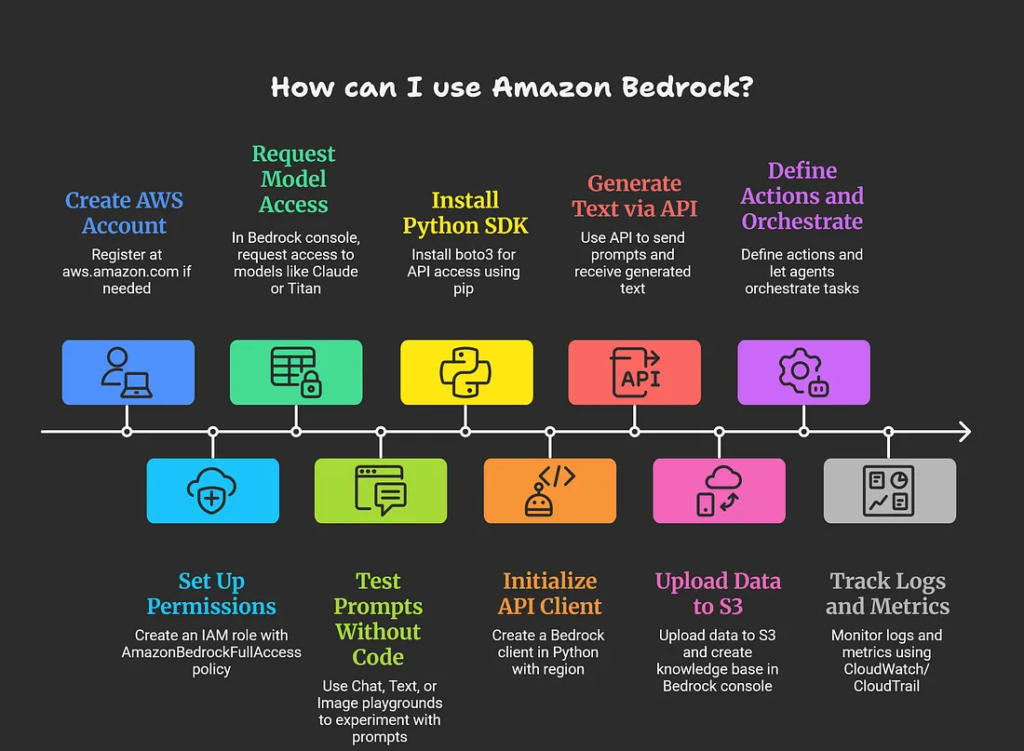
Create AWS account and IAM role: Sign up at aws.amazon.com if needed, then create an IAM role with AmazonBedrockFullAccess policy for Bedrock permissions.
Enable model access: In the Bedrock console (us-east-1, us-west-2, or ap-southeast-1), go to “Model access” > “Manage model access” and request access to models like Claude or Titan.
Explore playgrounds: Use Chat, Text, or Image playgrounds to test prompts without code; adjust parameters like temperature and view API requests for reference.
Using via Code (API)
Install boto3 (pip install boto3), create a Bedrock client, and invoke models with prompts. Example Python snippet for text generation:
import boto3
import json
bedrock = boto3.client(service_name=’bedrock-runtime’, region_name=’us-east-1′)
body = json.dumps({“prompt”: “Explain AWS Bedrock briefly.”, “max_gen_len”: 512, “temperature”: 0.5})
response = bedrock.invoke_model(body=body, modelId=”anthropic.claude-v2″, accept=’application/json’, contentType=’application/json’)
print(json.loads(response[‘body’].read()))
Advanced Usage
Build knowledge bases for RAG: Upload data to S3, create a knowledge base in Bedrock console, and query via API.
- Create agents: Define actions (e.g., Lambda functions) and let agents orchestrate tasks like querying databases.
- Monitor with CloudWatch/CloudTrail for logs and metrics.
- Test in the free tier where available; costs are pay-per-token after.
What else should I keep in mind when using Amazon Bedrock?
When using Amazon Bedrock, consider region availability, cost monitoring, model-specific limits, data privacy compliance, prompt engineering best practices, and fallback strategies for reliability.
Important Considerations
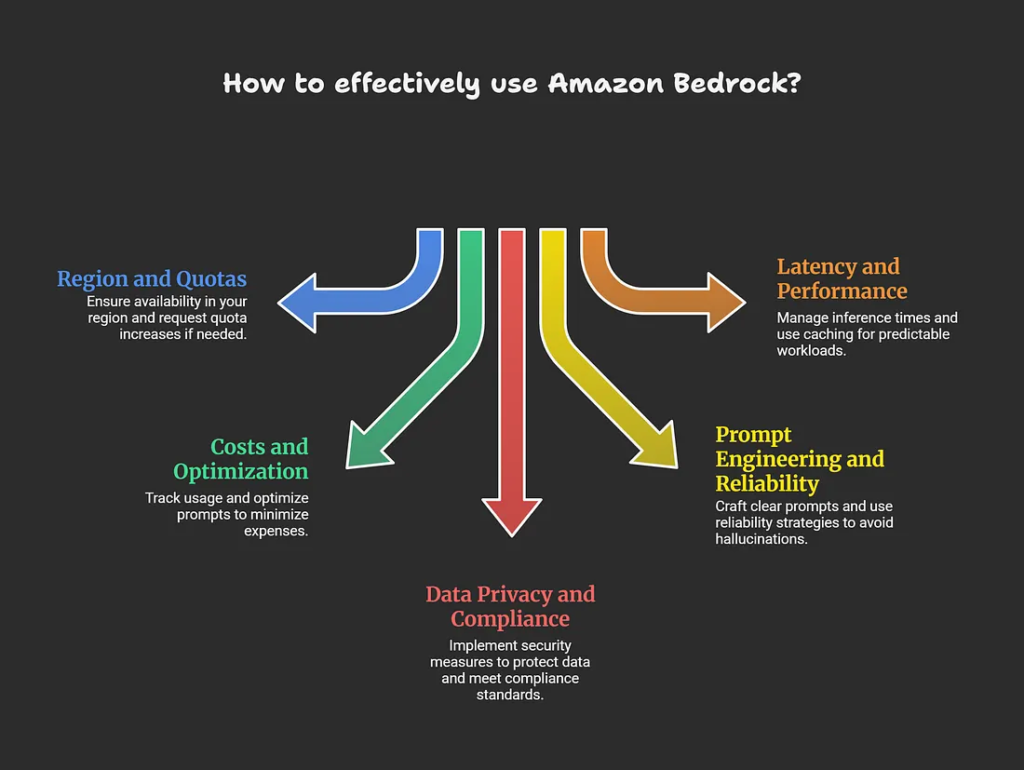
Region and quotas: Bedrock is available in specific regions (e.g., us-east-1, eu-west-1); check console for model access and request increases via AWS support if hitting TPS or token limits.
Costs and optimization: Pay-per-token/input-output (e.g., $0.0004–$0.075/1k tokens depending on model); use CloudWatch for usage tracking, shorter prompts, and model comparison tools to minimize expenses.
Data privacy and compliance: Your prompts/responses stay private (no training on customer data), but enable encryption, IAM least-privilege, VPC endpoints, and Guardrails for PII/harmful content filtering to meet GDPR/HIPAA.
Prompt engineering and reliability: Craft clear, specific prompts; test for hallucinations with RAG; implement retries, model fallbacks (e.g., switch Claude to Llama), and human-in-loop for critical apps.
Latency and performance: Inference times vary (200ms–seconds); use Provisioned Throughput for predictable workloads and caching where possible.
Best Practices
Monitor via CloudWatch alarms, version agents/knowledge bases, start small in playgrounds, and review AWS Well-Architected Framework for GenAI workloads. Free tier offers limited testing; scale thoughtfully as usage grows.
How much does Amazon Bedrock cost?
Amazon Bedrock pricing is pay-per-use with no upfront costs or minimums for on-demand inference, charged primarily per 1,000 input/output tokens (typically $0.0001–$0.075 depending on model), plus extras for customization, storage, and Provisioned Throughput.
Pricing Breakdown
| Category                 | Details                                                                 | Example Costs                                                                 |
|--------------------------|-------------------------------------------------------------------------|--------------------------------------------------------------------------------|
| On-Demand Inference      | Per 1k input/output tokens; varies by model/provider/region              | Claude 3.5 Sonnet: $0.003 input / $0.015 output (US East); Titan Text: ~$0.0008 / $0.0016 |
| Provisioned Throughput   | Hourly for committed capacity; discounts for 1/6-month terms             | Claude Instant: $24–$86/hour per model unit (varies by region/commitment)     |
| Customization            | Fine-tuning, Custom Model Units (CMU) billed per minute + $1.95/month storage | CMU v1.0: $0.057/min (US East); billed in 5-min windows                        |
| Other Features           | Guardrails, Knowledge Bases, Agents, Images                               | Guardrails: $0.15/1k text units; Images: $0.03–$0.60 per image                |
| Free Tier                | Limited testing available in some regions                                 | Varies; check console for eligibility                                         |
Key Notes
Prices differ by region (e.g., US East cheaper than Europe), model (Amazon Titan/Nova often lowest), and volume — use the AWS Pricing Calculator or CloudWatch for estimates and monitoring. No data transfer fees within AWS; optimize by selecting efficient models, shorter prompts, and Provisioned Throughput for high-volume apps. Always verify latest rates on the AWS Bedrock pricing page, as they update frequently (e.g., effective Dec 2025 changes).