
Odoo Community vs Enterprise Version 19: Which One Is Right for Your Business?
This blog will help you understand the differences between Odoo Community Edition (C.E.) and Odoo Enterprise Edition (E.E.) and make a clear decision about which edition best fits your business needs.
Introduction
Odoo began in 2005 (originally named TinyERP) as an open-source ERP project founded by Fabien Pinckaers. Over two decades it evolved into a full-suite business application platform covering accounting, CRM, inventory, manufacturing, eCommerce, HR, project management, and more. Today Odoo reports millions of users worldwide across tens of thousands of companies, and its ecosystem of community modules and partners has made it one of the most widely adopted ERP options in markets such as India, where both SMBs and larger enterprises increasingly use Odoo for localized accounting, GST compliance, and multi-channel retail needs. Odoo 19 continues the two-edition model: Community as the open-source foundation, and Enterprise as the licensed, feature-rich layer built on top of it. This post breaks down what each edition includes, how they differ in practice, and practical guidance to choose the right one for your organization.
What is Odoo Community?
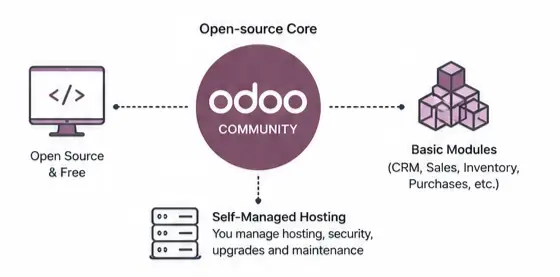
Odoo Community is the open-source edition of Odoo. It gives you the core ERP framework and can work well for smaller teams, basic workflows, and businesses that want more control over customization without paying for the licensed edition. Odoo’s edition page describes Community as the base version on which Enterprise is built.
Key aspects and available features include:
- Core modules: CRM, Sales, Purchase, Inventory, Manufacturing (MRP basics), Project, Timesheets, Tasks, POS (basic), Website builder, eCommerce (basic), and basic Invoicing.
- Accounting basics: Invoicing, customer/vendor ledgers, journal entries; however, advanced localization, automated tax engines, and full-featured enterprise accounting workflows are limited compared with Enterprise.
- Customization: Full access to source code and the ability to modify or extend modules directly, making it ideal for organizations with in-house developers or partners who can build custom functionality.
- Community apps and ecosystem: Thousands of community-contributed modules are available via OCA (Odoo Community Association) and other repositories to add features like advanced warehouse rules, specialized reports, connectors, and localizations.
- Hosting and maintenance: Typically self-hosted or hosted through third-party providers; upgrades, backups, and patching are managed by the customer or their implementation partner.
- No official Odoo support contract: Support is community-driven (forums, GitHub, partners) rather than backed by Odoo S.A.
Community is a strong choice when you need a cost-effective, flexible ERP base, can tolerate more manual configuration, and have development resources to extend or integrate missing features.
What is Odoo Enterprise?
Odoo Enterprise is the licensed version of Odoo. It includes the Community foundation plus more built-in functionality, official support, hosting options, upgrades, and tools like Studio for easier customization. Odoo’s edition comparison states that Enterprise adds business-process features and support that Community does not provide.
Highlights:
- Additional modules: Advanced Accounting (full-featured accounting, reconciliations), Payroll (where available), Document Management, Studio (drag-and-drop customization), Helpdesk, Field Service, Subscriptions, Advanced HR features, and more.
- Mobile and usability: Official mobile app support and enhanced UI/UX components that simplify day-to-day use.
- Hosting and upgrades: Options for Odoo.sh or Odoo’s managed hosting, automated upgrade paths, and guaranteed security patches.
- Official support and SLAs: Direct access to Odoo support and formal service levels for customers with Enterprise subscriptions.
- Faster implementation: Many enterprise workflows come out-of-the-box, reducing custom development and time-to-value, especially for accounting, payroll, document signing, and integrated reports.
Enterprise suits businesses that prioritize faster deployment, formal support, and a more complete, integrated feature set with fewer custom patches.
For most growing companies, Enterprise is easier to operate because it reduces the need for custom coding and patchwork solutions. Recent Odoo 19 comparison content also highlights Enterprise advantages such as accounting, payroll, documents, mobile support, and studio-based customization.

Main differences
Community vs Enterprise Edition
Here is a practical comparison of the two editions based on the current Odoo edition overview and Odoo 19 comparison content.
| Area | Community | Enterprise |
|---|---|---|
| License | Open-source | Licensed |
| Hosting and upgrades | More self-managed | Included support and upgrades |
| Support | Limited official support | Better official support options |
| Mobile app | Not supported | Supported |
| Accounting | Not available | Available |
| Invoicing | Available | Available |
| Payroll | Not available | Available |
| Sign documents | Not available | Available |
| CRM / Sales / POS | Available | Available |
| Website / eCommerce / Blog | Available | Available |
| Studio customization | Not available | Available |
WHICH ONE SHOULD YOU CHOOSE ?
- You are a very small team
- You have strong technical skills
- You want a low-cost ERP base
- You can manage hosting, customization, and maintenance yourself
- You want Faster Deployment
- You need built-in Business features
- You want official support & upgrades
- You prefer less technical overhead
Pro Tip:
Odoo’s “one free app” model lets small teams pilot a core function without upfront costs. It’s ideal for validating your workflow before scaling, as you can addon later